When a tuition bill, a refund, and several 529 withdrawals relate to the same expense, a list of transactions is not enough. This free Excel workbook connects documented expenses to withdrawal amounts so you can see what remains unmatched and which records need attention.
The XLSX organizes reviewed expenses, evidence references, refunds, and prior allocations by beneficiary and calendar year. It tracks expenditure reconciliation—not contributions, account growth, or savings projections—and does not determine tax eligibility.
Download and use the 529 expense tracker
Download the free XLSX directly from this page; no registration is required. Save a working copy, open it in Excel, and visit Reconciliation. Before replacing anything, follow the fictional example in the next section to understand how one expense can support several partial assignments.
The five sheets have separate jobs. Reconciliation summarizes each beneficiary/year pair. Expenses holds spending, receipt references, and deductions. Withdrawals records actual distributions and their statement references. Matches connects portions of withdrawals to expenses. Instructions provides operating guidance and space for your notes.
- Remove the example inputs when you are ready. Clear Reconciliation!A8:B10 and J8:J10, Expenses!A2:K4, Withdrawals!A2:F4, and Matches!A2:E4. These are the twelve Sample-tagged records. Preserve the headers, formulas, and prepared rows; do not delete entire rows.
- Set up your reconciliation. Enter your deliberate as-of date in Reconciliation!B3. Enter each beneficiary alias and calendar year in A8:B107, using one row per pair.
- Record expenses. Use the cream-colored input cells on Expenses. Give each expense a unique ID, beneficiary, paid date, description, and receipt reference. Enter gross spending, refunds, prior assistance allocation, and prior credit allocation. Use numeric zero for a genuinely absent deduction. Choose Pending until your documentation review is complete, then Reviewed.
- Record withdrawals separately. On Withdrawals, enter each actual distribution once, with its unique ID, beneficiary, date, evidence reference, and amount. A withdrawal is not an account balance or contribution.
- Assign amounts. On Matches, enter a unique Match ID, the relevant Expense ID and Withdrawal ID, and a positive dollar amount. Use additional match rows for partial assignments rather than duplicating the expense.
Return to Reconciliation and compare reviewed coverage, withdrawals, and matched amounts. The supplied example leaves $100 unresolved; the next section shows why. Your next action is to investigate the supporting records, not invent an assignment to force a zero. Check the record statuses and Workbook issues, save the populated XLSX, and retain the referenced evidence files separately.
Follow one expense through two withdrawals
In the downloadable workbook, expense E1 belongs to beneficiary A and has a paid date of 12/01/2026. Its $1,000 gross amount is reduced by $100 in refunds, $200 previously allocated to assistance, and $100 previously allocated to credits. The resulting reviewed coverage is $600: $1,000 minus those three deductions.
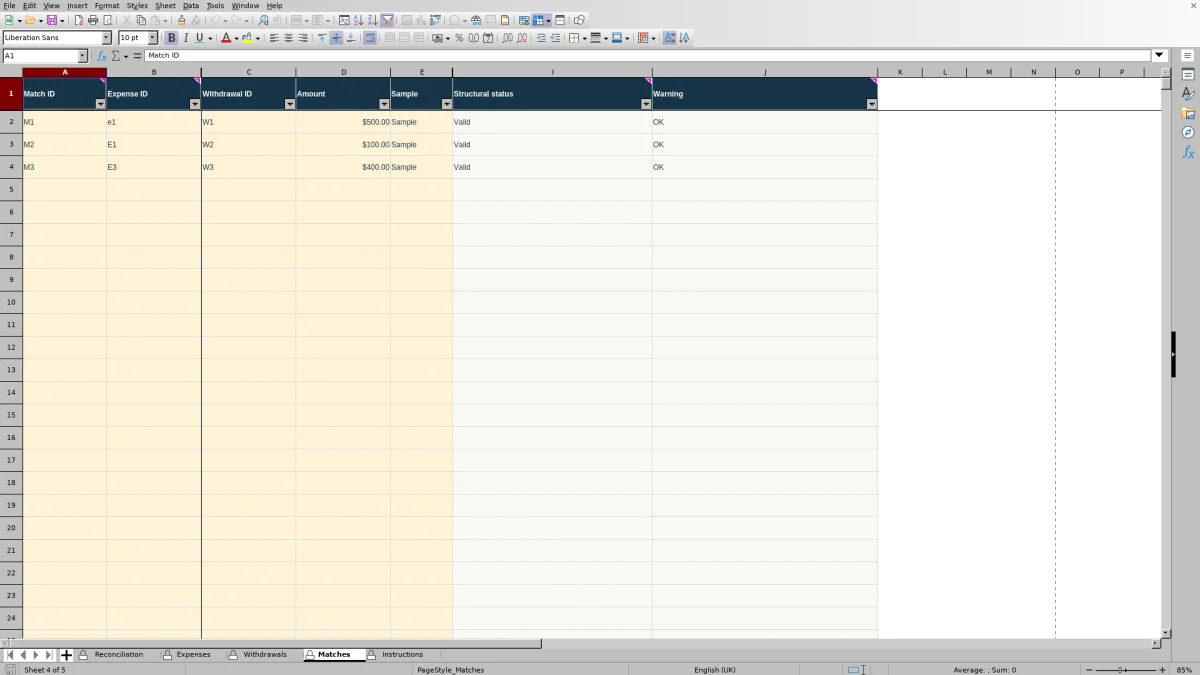
The corresponding withdrawals are separate records with separate evidence. W1 records $500 on 12/05/2026; W2 records $200 on 12/20/2026. Match M1 assigns $500 from W1 to E1, and M2 assigns $100 from W2 to E1. The two assignments total $600, but the expense and its receipt appear only once.
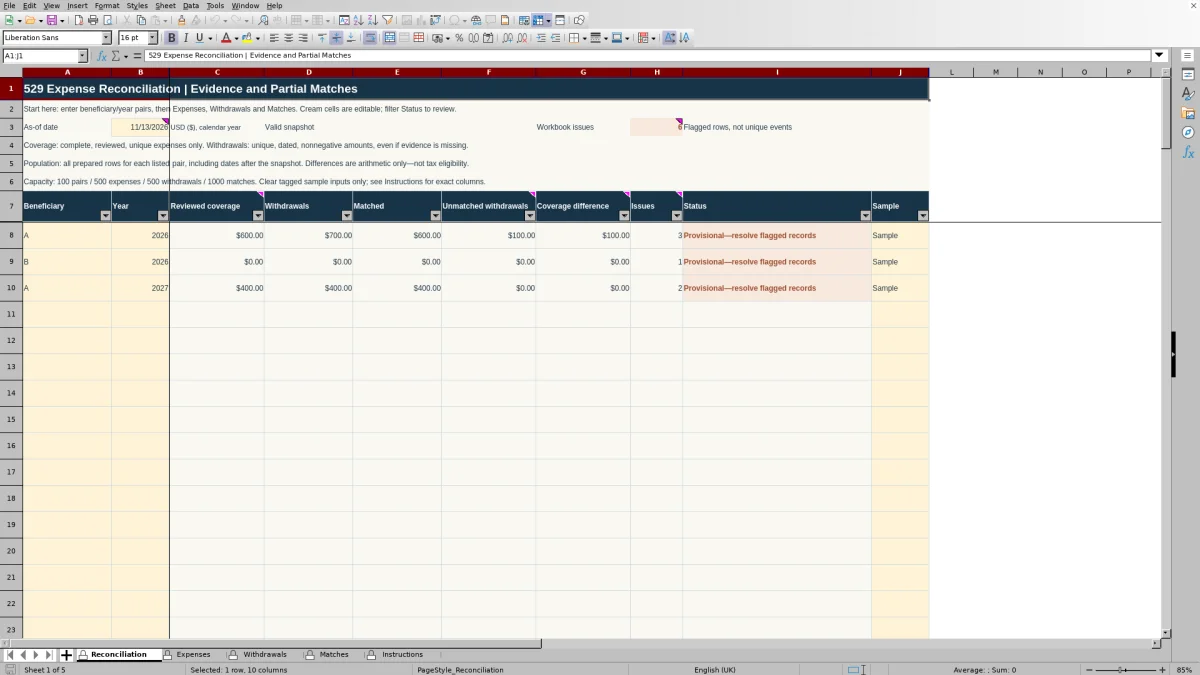
Reconciliation shows three distinct amounts for A/2026: $600 reviewed coverage, $700 withdrawals, and $600 matched. W2 still has $100 unmatched. The coverage difference is also $100 because total withdrawals exceed reviewed coverage by that amount. Those two differences happen to agree here; one compares withdrawals with assignments, while the other compares withdrawals with coverage.
The saved as-of date is 11/13/2026, earlier than these sample transactions. The later dates trigger warnings without removing the amounts from the totals, so the example remains provisional. Check real transaction dates and the intended snapshot before interpreting similar warnings in your own records.
To see why refunds matter, consider changing Expenses!G2 from $100 to $150 in a disposable copy. Based on the workbook formulas, coverage would fall to $550 and the coverage difference would rise to $150. Existing assignments would remain $600, leaving E1 over-allocated by $50; unmatched withdrawals would remain $100. Review the assignments after any refund, then restore or clear the fictional inputs before entering personal records.
Create a small expense reconciliation in Excel
For a small working lesson, create a separate workbook with a sheet named Practice. These coordinates belong to the exercise, not the download. It covers one beneficiary, one expense, and two manually assigned withdrawal amounts. It does not perform automatic ID matching or duplicate detection.
Enter the expense and withdrawal records
In A1, enter “Single-expense reconciliation practice — USD ($).” Put “Beneficiary” in A2 and STUDENT-A in B2. Put “Calendar year” in C2 and 2026 in D2. That beneficiary applies to the entire exercise; there is no beneficiary lookup.
Set up A4:J5 using the following layout. Enter the date as an actual Excel date, the dollar amounts as numbers, and leave I5 and J5 for formulas.
| Column | Row 4 header | Row 5 entry |
|---|---|---|
| A | Expense ID | EXP-01 |
| B | Paid date | 12/01/2026 |
| C | Gross (USD) | 1000 |
| D | Refunds (USD) | 100 |
| E | Prior assistance (USD) | 200 |
| F | Prior credits (USD) | 100 |
| G | User review | Reviewed |
| H | Receipt reference | Practice receipt EXP-01 |
| I | Expense year | Formula below |
| J | Reviewed coverage (USD) | Formula below |
In A7, enter “Assignments below apply only to EXP-01 and the beneficiary above.” Across A8:F8, enter these headers in order: Withdrawal ID, Withdrawal date, Evidence reference, Withdrawal (USD), Withdrawal year, and Assigned to EXP-01 (USD).
For row 9, enter WD-01 in A9, 12/05/2026 in B9, “Practice statement WD-01” in C9, 500 in D9, and 500 in F9. For row 10, enter WD-02 in A10, 12/20/2026 in B10, “Practice statement WD-02” in C10, 200 in D10, and 100 in F10. Leave E9:E10 for formulas. The assignments in F9:F10 refer only to EXP-01 and require your document review.
Calculate coverage and selected-year totals
In I5, derive the calendar year from the expense paid date.
=YEAR(B5)In J5, calculate coverage only when the expense year matches D2, review is marked Reviewed, a receipt reference is present, and all four amount cells contain numbers. Otherwise, the result stays blank. Use valid dates and nonnegative inputs; this short lesson does not reproduce every validation rule in the download. Enter zero for an absent deduction, not for information you have not yet obtained.
=IF(AND(I5=$D$2,G5="Reviewed",H5<>"",COUNT(C5:F5)=4),C5-D5-E5-F5,"")In E9, extract the first withdrawal's year.
=YEAR(B9)In E10, extract the second withdrawal's year.
=YEAR(B10)Label A13 “Selected-year withdrawals (USD).” In B13, total withdrawal amounts whose year equals D2. SUMPRODUCT combines the year comparisons with the aligned dollar amounts; the double minus converts each comparison into a numeric inclusion indicator.
=SUMPRODUCT(--(E9:E10=$D$2),D9:D10)Label A14 “Selected-year assignments (USD).” In B14, use the same year selection to total the manually assigned amounts.
=SUMPRODUCT(--(E9:E10=$D$2),F9:F10)Label A15 “Unmatched withdrawals (USD).” In B15, subtract assignments from withdrawals.
=B13-B14Label A16 “Withdrawals minus coverage (USD).” In B16, compare withdrawals with reviewed coverage, leaving the result blank when coverage is unavailable.
=IF(ISNUMBER(J5),B13-J5,"")Label A17 “Expense coverage remaining (USD).” In B17, subtract assignments from coverage to reveal any unused coverage or excessive assignment.
=IF(ISNUMBER(J5),J5-B14,"")Check the result and change the refund
The baseline should show $600 in J5 and, down B13:B17, $700, $600, $100, $100, and $0. An independent arithmetic check is straightforward: the three deductions total $400, leaving $600 coverage; withdrawals total $700, while assignments total $600.
Now change D5 to 150. Coverage becomes $550, the coverage difference becomes $150, and expense coverage remaining becomes negative $50. Withdrawals, assignments, and unmatched withdrawals remain $700, $600, and $100. The negative balance tells you to revisit the assignments because the refund reduced the expense amount available to support them.
Format B5 and B9:B10 as MM/DD/YYYY. Display the dollar inputs and outputs as USD with two decimal places, then save the exercise. No formulas need to be copied beyond the specified cells. Use the downloadable workbook when you need linked registers, several beneficiaries, or checks across many records.
Decide what belongs in reviewed coverage
Start with source documents, not an assumption that every education-related purchase qualifies. Each expense needs a unique ID, consistent beneficiary alias, paid date, description, and receipt reference. Keep receipts, refund records, and allocation notes in an organized folder, using references that let you locate them later. Do not enter Social Security numbers or bank credentials.
Gross spending is the original amount recorded for the expense. Refunds are cumulative amounts returned against that expense. Prior assistance allocation and prior credit allocation identify amounts already assigned elsewhere. These deductions need to be reviewed and nonoverlapping: subtracting the same allocated dollars twice would understate coverage, while omitting an allocation would overstate it.
Record a refund against the original expense rather than creating another expense row. Retain its supporting record and update the reference or description as needed. Then revisit any matches already assigned to that expense; the withdrawal itself may be unchanged even though the available coverage has fallen.
Reviewed means your documentation review, not tax approval. A Pending record supplies no reviewed coverage yet. Likewise, a blank deduction is incomplete information, while an explicit zero means you have determined that no deduction applies. This distinction keeps missing information from looking like a completed calculation.
IRS Topic 313 provides qualified tuition program context, and Publication 970 addresses education-benefit coordination. Amounts allocated to tax-free assistance or education credits cannot also supply available QTP expense coverage. Consult the applicable rules and publication edition for your circumstances; this workbook does not determine those allocations for you. Federal and state treatment can differ, and neither a Reviewed entry nor balanced arithmetic certifies either treatment.
Assign partial amounts without reusing an expense
Keep the identity of each record separate. An Expense ID identifies one expense. A Withdrawal ID identifies one actual distribution. A Match ID identifies one positive assignment between those two records. One expense can receive several assignments, and one withdrawal can be divided among several expenses. Neither arrangement requires repeating the gross expense or recording the withdrawal again.
Each match must reference a unique expense and withdrawal with the same beneficiary and calendar year. A new Match ID does not, by itself, make repeated use of the same dollars acceptable. Review the total assigned, not just whether each row has a different identifier.
The workbook distinguishes a valid connection from a sufficient available amount. A structurally valid match can still assign too much. Such assignments remain counted, so a negative Remaining amount on Expenses or a negative Unmatched amount on Withdrawals exposes the excess. The workbook does not silently cap the assignment and hide the discrepancy.
When an allocation warning appears, compare the receipt and withdrawal evidence, check for a new refund or changed prior allocation, and correct the actual match amount or reference. Do not increase gross spending or reduce a real withdrawal merely to make the summary balance.
Missing withdrawal evidence is a different problem. An otherwise valid, uniquely identified withdrawal can remain in total withdrawals even without its evidence reference, but it cannot support a valid match until that documentation reference is supplied. Obtain the statement rather than removing the distribution from your records.
Keep beneficiaries and calendar years separate
Every summary row represents one beneficiary/calendar-year pair. Reuse the same beneficiary alias across the registers, and add a separate summary pair when the year changes. An academic year spanning two calendar years is not a single grouping in this workbook.
The December E1, W1, and W2 sample records belong to A/2026. Expense E3, dated 01/05/2027, and withdrawal W3, dated 01/10/2027, belong to A/2027. Their $400 coverage, withdrawal, and assignment remain separate from 2026. If a match reports a calendar-year mismatch, examine the source dates and references; do not alter documentary dates simply to bypass the warning.
The as-of date is an alert reference, not a totals cutoff. Reconciliation!B3 is deliberately maintained, not an automatically changing current date. All prepared records for a listed pair remain included in the relevant calculations, including records dated after the snapshot. Updating B3 can therefore change future-date warnings without changing the dollar totals.
Read zeros and blanks in that context. The B/2026 sample shows zero reviewed coverage because its expense is Pending, not because no spending occurred. Duplicate beneficiary/year pairs withhold summary amounts to avoid duplicate totals. Before treating a zero or blank as a completed result, inspect the underlying record and pair status.
Resolve warnings before relying on the totals
Use the warnings to decide what to review next. First check the as-of date and beneficiary/year pair. Then inspect Status on Expenses and Withdrawals, followed by Structural status and Warning on Matches. Each record displays its first unresolved problem; after correcting it, recheck because another issue may become visible.
- For missing dates, amounts, evidence, or review decisions, return to the source documents and complete the record.
- For broken references, compare the entered Expense ID or Withdrawal ID with its source register.
- For duplicate IDs, identify the intended records and give genuinely different transactions distinct IDs.
- For over-allocation, review the assignments and the current expense deductions rather than editing calculated totals.
IDs and beneficiary aliases are literal and case-insensitive: E1 and e1 are the same identity. Changing capitalization does not resolve a duplicate. Special characters are treated as ordinary characters, and accidental spaces should be avoided. Duplicate expense or withdrawal identities invalidate the affected references rather than selecting an arbitrary first record.
Workbook issues counts flagged rows and controls, not unique real-world incidents. A single underlying problem can affect several rows. The pair-level Issues column has narrower coverage, and any workbook issue makes otherwise usable pairs provisional. The original sample's six issues are expected record warnings, not six confirmed tax problems.
Zero differences do not override unresolved evidence or review. Preserve a backup before edits, use the existing filters to focus on affected records, and leave protected formulas intact. The protected sheets support input entry and existing filters, not sorting. Recheck both record warnings and the summary after every correction.
Save a usable record for follow-up
Save the editable XLSX with a clear filename that identifies the reconciliation and version. Retain its receipts, statements, refund evidence, and allocation notes separately. A printed summary cannot replace those source documents or the detail registers that explain the assignments.
If questions remain, preserve the provisional status and add a short follow-up note identifying the record and missing information. Instructions!A21:B100 is available for user notes. The workbook does not automatically maintain an audit history, so save an earlier version before adding later refunds or changing allocations.
For paper or PDF delivery, choose the summary and supporting detail the recipient needs. Reconciliation has a prepared print area of A1:I107 with rows 1–7 repeated. Expenses uses A1:Q501, Withdrawals uses A1:K501, and Matches uses A1:J1001; each register repeats its header row. Filter to populated records and inspect print preview, especially for the wide expense register, rather than printing every prepared row. Keep dollar amounts displayed with two decimal places and dates as MM/DD/YYYY.
For continued recordkeeping, stay within the fixed capacities: 100 beneficiary/year pairs in Reconciliation rows 8–107, 500 expenses and 500 withdrawals in rows 2–501, and 1,000 matches in rows 2–1001. These ranges do not expand automatically. Keep connected records together so each assignment remains traceable, and review warnings after every update.
The useful deliverable is an organized evidence trail and a clear list of unresolved arithmetic or documentation questions—not a savings forecast, tax return, eligibility certificate, or calculation of penalties.
About the authors